How to Download Masked Aadhaar Card PDF (What It Means & Why It’s Safe)

You can easily complete Masked Aadhaar Card Download online from the official UIDAI portal. 

Aadhaar is one of the most important identity proofs for Indian citizens and NRIs. It is used for banking, SIM verification, government schemes, and several daily services. However, many people hesitate to share their Aadhaar card everywhere due to privacy and security concerns. To address this, UIDAI introduced a privacy-friendly version called the Masked Aadhaar.

A Masked Aadhaar is a version of your Aadhaar card where the first eight digits of your Aadhaar number are hidden (masked) with the letter “X”, showing only the last four digits.

For example:
If your Aadhaar number is 1234 5678 9012, your Masked Aadhaar will display as XXXX XXXX 9012.

All other details such as your name, address, photo, date of birth, and QR code remain exactly the same. The QR code can still be scanned to verify your identity securely.

This format ensures your Aadhar Card number isn’t fully visible, protecting it from misuse while still allowing you to present your Aadhaar as a valid identity proof when needed.

Step-by-Step Guide for Masked Aadhaar Card Download

Follow the official method below to download your Masked Aadhaar PDF safely from the UIDAI website.

Step 1: Visit the official UIDAI website at https://uidai.gov.in.

Step 2: From the top menu, select the ‘My Aadhaar’ tab and click on ‘Download Aadhaar’.

Optional Step: If you are reading this guide on a website that provides Aadhaar download help, you may also click on the “Download Now” button at the top of this page to be redirected to the official UIDAI download page instantly.

Step 3: You’ll now see three options to download Aadhaar. Choose one of the following methods based on what you have available:

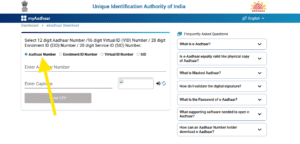
Method 1: Aadhaar Number

If you already have your Aadhaar card, enter your 12-digit Aadhaar Number, your Full Name, and PIN code.
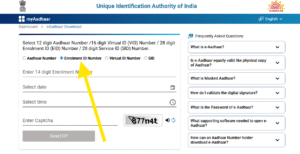
Method 2: Enrolment ID (EID)

If you haven’t received your Aadhaar card yet, use your 28-digit Enrolment ID (EID) printed on the acknowledgment slip, along with your Full Name and PIN code.
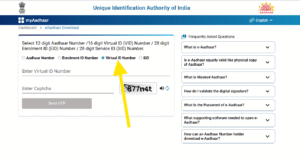
Method 3: Virtual ID (VID)

If you have a 16-digit Virtual ID (VID), you can use it instead of Aadhaar or EID to download your card. The VID can be generated anytime using the mAadhaar app or the UIDAI website.
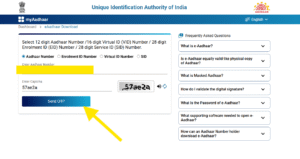
Step 4: Enter your selected number (Aadhaar, EID, or VID) in the box.
Then type the captcha shown on the screen and click “Send OTP.”
Step 5: Enter the OTP received on your registered mobile number in the “Enter OTP” box.
You will now see a checkbox labeled “Do you want a masked Aadhaar?”
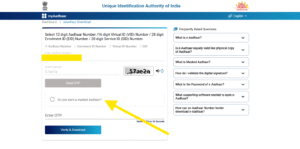
Tick this checkbox to download the masked version (only last 4 digits visible).

Step 6: Click on “Verify & Download.”

Once verified successfully, your Masked Aadhaar PDF will start downloading automatically.

How to Open the Downloaded Masked Aadhaar PDF

The Aadhaar PDF is password-protected for your safety.
To open it, use this password format:

First four letters of your name in CAPITALS + Year of Birth

Why Masked Aadhaar Is Safer

  • Protects your identity: The first 8 digits of your Aadhaar number are hidden.

  • Legally valid: Issued and digitally signed by UIDAI.

  • Prevents misuse: Even if someone gets a copy, your Aadhaar number stays protected.

  • Accepted widely: For most verifications like courier, hotels, banks, and private institutions.

It’s especially useful when you just need to provide ID proof but don’t want to expose your complete Aadhaar number.

FAQs – Masked Aadhaar

Q1. Is a Masked Aadhaar valid everywhere?
Yes. It is digitally signed by UIDAI and valid as identity proof, except where your full Aadhaar number is specifically required.

Q2. Can I use a Masked Aadhaar for bank or SIM verification?
Yes. It is accepted by banks and telecom operators since the QR code contains verified Aadhaar details.

Q3. Can NRIs use this download option?
Yes. NRIs who have Aadhaar can also download the masked version from anywhere using their registered mobile number.

Q4. What if my mobile number is not registered?
You can use Face Authentication (if available) instead of OTP.

Q5. Can I download it multiple times?
Yes. There’s no restriction on the number of downloads.

Q6. What’s the difference between normal and masked Aadhaar?
Normal Aadhaar shows all 12 digits. Masked Aadhaar hides the first 8 digits for better privacy and protection.

Leave a Comment

Your email address will not be published. Required fields are marked *

Scroll to Top